
Offer your Shopify fashion clients size recommendations and virtual try-on
AI Frame adds a Size Chart, a Size Recommender and Virtual Try-On to a product page with one theme block, with no custom development. Join the partner program to set it up for your clients and earn from setup jobs and referrals.
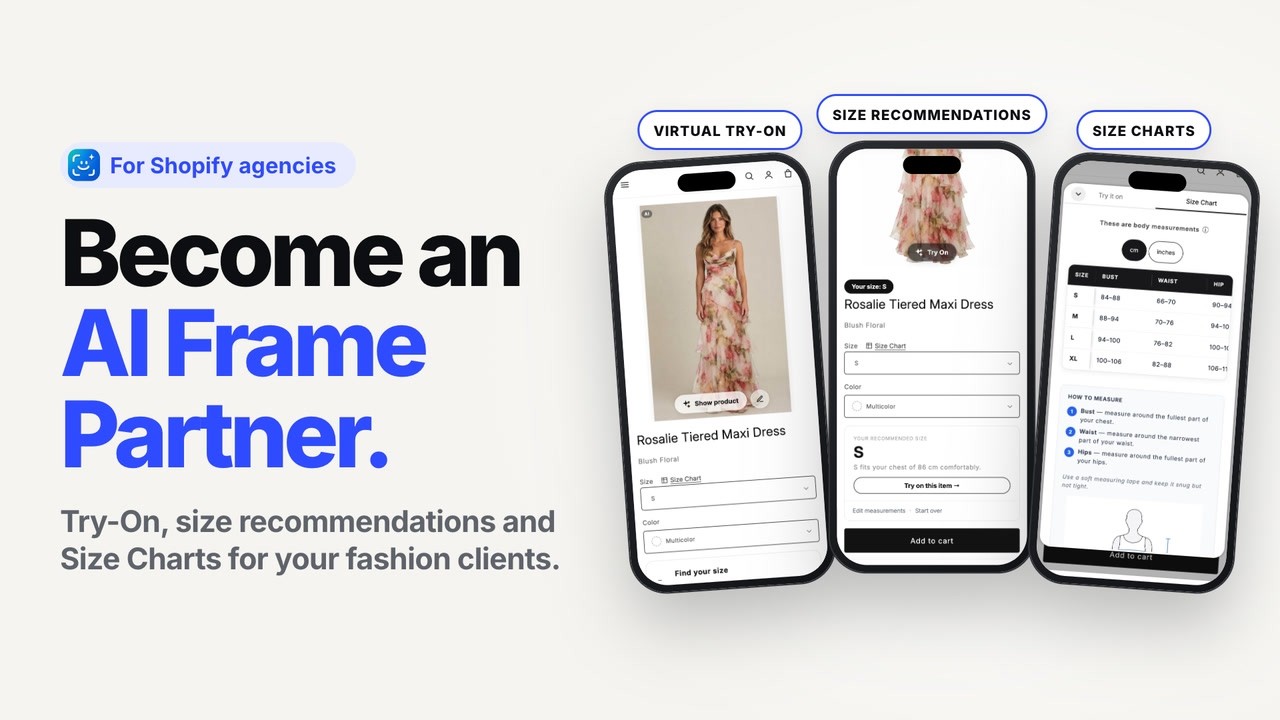
Shoppers see their size and how it looks on them
AI Frame is a Shopify app for fashion stores. On the product page, shoppers see which size to pick and see the item on their own photo, before they add it to the cart.
- ✓A size next to the size picker, based on the shopper's height and weight and the store's Size Chart
- ✓The item on the shopper's own photo, labeled as AI-generated
- ✓A dashboard that shows recommendations, try-ons and the orders that followed
Free
to start. Paid plans from $19.99 a month, with a 7-day free trial.
See AI Frame on ShopifyThe store owner pays the normal subscription through Shopify. There are no per-order fees.
There is no separate setup fee from AI Frame.
One app, one theme block
Size Chart, Size Recommender and Virtual Try-On come together and are switched on with a single block.
Why consider it for your fashion clients
Fashion stores get size questions and size-related returns all the time. AI Frame gives shoppers an answer on the product page, and you can set it up without writing code.
- ✓No custom development. The setup is measurement tables plus one theme block, and it can go on a copy of the current theme first.
- ✓One app for sizing. Once everything is checked, the old size app and its charts can be removed from the storefront.
- ✓Charts follow your rules. A chart assigned to a brand, category, collection or tag applies to all current and future products that match.
- ✓Easy for a client to try. There is a free plan, and paid plans have a 7-day free trial.
- ✓Something to report on. The dashboard shows recommendations, try-ons and the orders that followed. The full dashboard is on the Growth plan and up.
- ✓You are paid for it. Partners earn per setup job and 15% of each referred store's subscription for its first 12 months, without changing the client's price.
Setting it up on a client's store
Most of the work is collecting the measurement tables. The app itself takes little time to set up.
Which plan fits a client
| Plan | Price | Charts | Size picks | Try-ons |
|---|---|---|---|---|
| Free | $0 | 10 | 50 | 10 |
| Starter | $19.99 | 30 | 500 | 80 |
| Growth | $59.99 | 100 | 3,000 | 350 |
| Advanced | $199.99 | Unlimited | Unlimited | 1,400 |
Price is per month. Charts are Size Charts, and size picks are size recommendations. Extra try-ons are charged per try-on. To estimate a plan, ask the client for their monthly sessions or product page views. See the current plans on the Shopify App Store.
Bring it up with a client
You do not need to pitch software. Start from what the client already deals with.
- 1Ask about sizing. Do shoppers ask which size to pick? Do orders come back because of the size? If so, there is a reason to talk about it.
- 2Show it on their products. AI Frame can make a demo on the client's own products for free, so they see it before they decide.
- 3Offer to set it up. Handle the setup yourself as part of your work with the client, or ask AI Frame to take care of it. Any fee you charge for the setup is your own.
A message you can send
Become a setup partner
We're choosing our first five setup partners now. It's free to join.
- ✓Paid setup jobs from AI Frame, at a set rate per job
- ✓Free prospect demos on your prospects' own products, for your pitches
- ✓15% of what each store you refer pays for its first 12 months
Partner questions: Jasmine, co-founder of AI Frame, jasmine@aiframe.app
Setup or app questions: support@aiframe.app or the Help Center
Who we're looking for
Simple criteria, so merchants know what to expect.
- 1You build Shopify stores for fashion brands
- 2You've set up AI Frame on one store. We give you a test store if you need one
- 3You answer within two working days
Good to know
Do partners pay to join?
No. Joining is free. Partners are chosen because they build fashion stores, have set up AI Frame and answer quickly.
How do partners earn from AI Frame?
Partners are paid for each setup job. Partners who also refer a store through their partner link get 15% of what that store pays for its first 12 months. That doesn't change what the merchant pays.
Who pays for the app?
The store owner pays the normal AI Frame subscription through Shopify. There is no separate setup fee from AI Frame.
Can we test it on the client's store first?
Yes. Add the block to a copy of the current theme and check a few products before anything goes live. Charts also stay as drafts until you publish them.
What if the client has more than 30 charts?
The Starter plan covers 30 Size Charts and the Growth plan covers 100. Email support@aiframe.app with a link to the store if you want help choosing.
Can we handle the setup ourselves?
Yes. Many agencies do it as part of their work with the client. If you would rather not, AI Frame can set it up for the client.
Who do I contact if something goes wrong?
Email support@aiframe.app, about the setup or about the app, and we'll help.
