
1
Create or import your chart
Add sizes and measurements, or import from a PDF, CSV or photo.
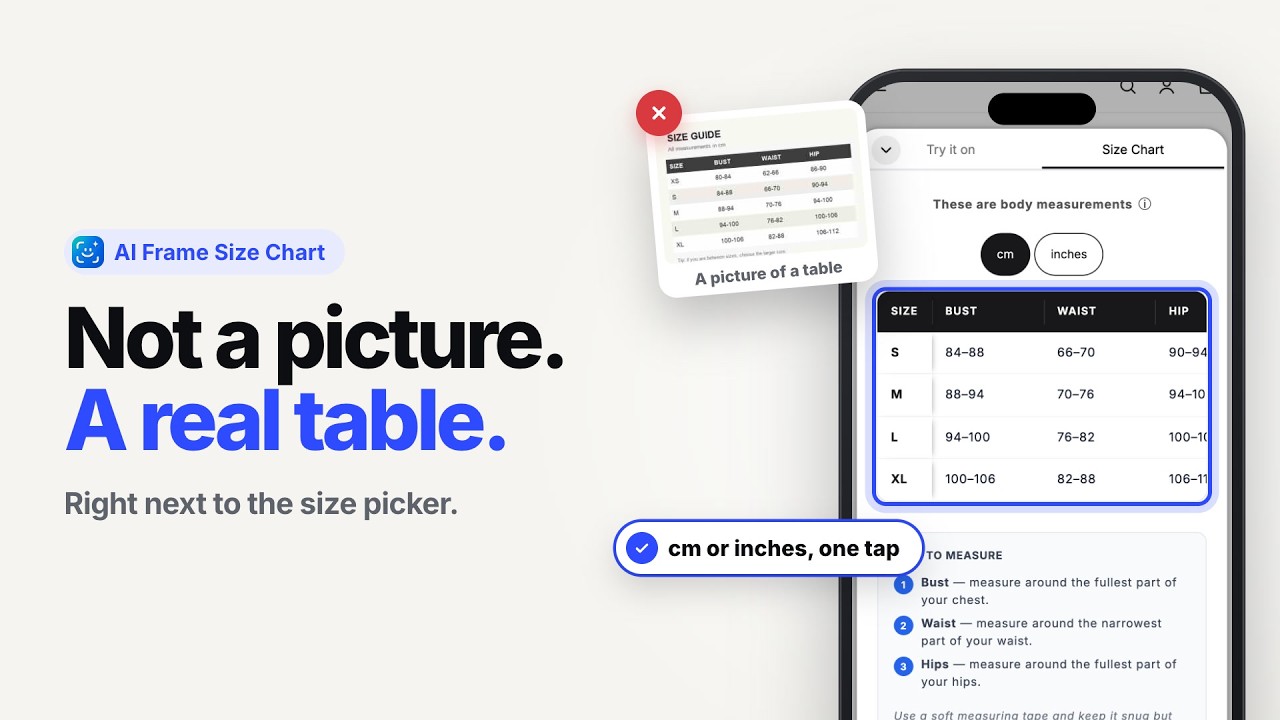
A real table in cm and inches, not a picture.
Create your size charts once, assign them to the right products, and show them where shoppers choose a size. Import what you already have from a PDF, CSV or photo, or let AI Frame scan your site.
A table that is tiny on a phone, in one unit, copied onto products it does not fit, costs you sales and returns.
See where the Size Chart sits and how shoppers use it.
Open a product and look at the Size Chart next to the size picker. Switch between cm and inches.
Open the live demo store →
Virtual Try-On on a Shopify product page
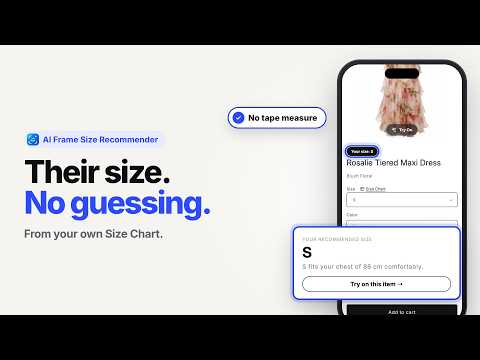
Size Recommendations on a Shopify product page
Three steps, and no code.
Add sizes and measurements, or import from a PDF, CSV or photo.
Connect the chart to all products, specific products, categories, tags, a vendor or collections.
Customers open the chart on the product page before they pick a size.
Size Charts work on their own. The same chart can also power AI Frame Size Recommendations, so shoppers get a suggested size as well as the numbers.
Start from what you have. You do not need to retype everything.
Upload a size chart file and AI Frame turns it into a table.
Snap or upload a photo of a chart and import it.
Let AI Frame find the size charts already on your site.
Add sizes and measurements yourself, with cm and inches.
What a good size chart can do for your store.
The chart sits next to the size picker, in a readable table, in the unit they use.
Assign one chart to many products. Edit it once and every product that uses it updates.
The same chart can power Size Recommendations, so you do not need to redo your sizing work.
Results vary by store. A size chart gives shoppers the measurements. It does not guarantee fit.
Reviews are from the Shopify App Store.
“AI Frame solved our 2 biggest problems overnight. Customers were always messaging 'will this fit me?' Now they try it on with one photo and check the size chart right there. Setup took 10 minutes with CSV import.”Nexus · United States · Shopify App Store review
“Excellent app with a clean interface and smooth performance. The virtual try-on and size chart features work perfectly together, making it easier for customers to choose the right product.”DesignerScarf Us · United States · Shopify App Store review
“The AI try-on feature is surprisingly accurate and gives customers much more confidence before purchasing. Setup was quick, and the support team has been very responsive.”Love Token US · United States · Shopify App Store review
Each one works independently. Together they answer the two questions shoppers have before they buy.
Shoppers see a garment on their own photo, on your product page.
Shoppers get a suggested size based on your own size chart.
A real measurement table in cm and inches next to the size picker.
You are here.
It depends on what you need. AI Frame Size Charts show a real, readable measurement table in cm and inches next to the size picker, import your existing charts from PDF, CSV or photos, and work with the free plan. You can try it on your own store before you decide.
Yes. You can import from a PDF, a CSV or a photo, let AI Frame scan your website, or add a chart manually.
Yes. Assign one chart to all products, specific products, categories, tags, a vendor or collections. Edit the chart once and every product using it updates. A new product gets the chart when it has the chart's tag or is added to it.
Yes. Shoppers can view measurements in centimetres or inches.
A real table is easier to read on a phone, easier to edit, and can be read by search engines and AI assistants, which usually cannot read text inside an image. See HTML vs image size chart.
Yes. Size Charts are included on the Free plan. See the App Store listing or the pricing section for current limits.
Yes. Size Charts work on their own. You can add Size Recommendations or Virtual Try-On later. See size charts without virtual try-on.
AI Frame is added to your store as a Shopify theme app block, so you place it in the theme editor where you want it. If you use a page builder such as PageFly or GemPages, see our integrations page.
Install AI Frame free from the Shopify App Store and add a Size Chart to your first product today.
 AI Frame
Virtual Try-On and Size Chart for Shopify fashion stores.