
Show shoppers the size and scale of bags and luggage.
Shoppers see the bag at its real size, on a figure of their height and next to everyday objects, and what fits inside. Suitcases show which airlines they fit.


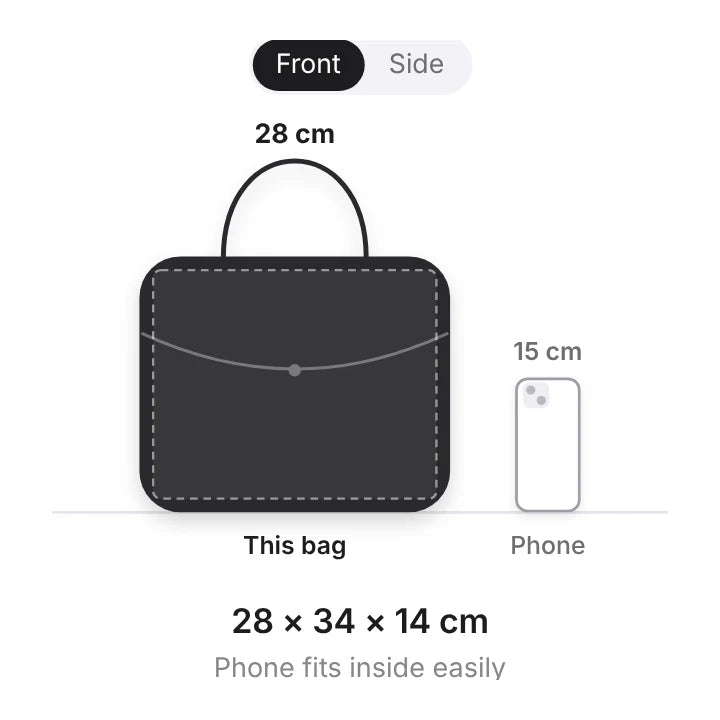
“How big is it, really?”
Height, width and depth in centimetres are hard to picture. Shoppers want to know how big it looks on them, whether their things fit, and whether a suitcase is allowed on their airline.
28 × 34 × 14 cm doesn’t tell a shopper how big a bag looks when they carry it.
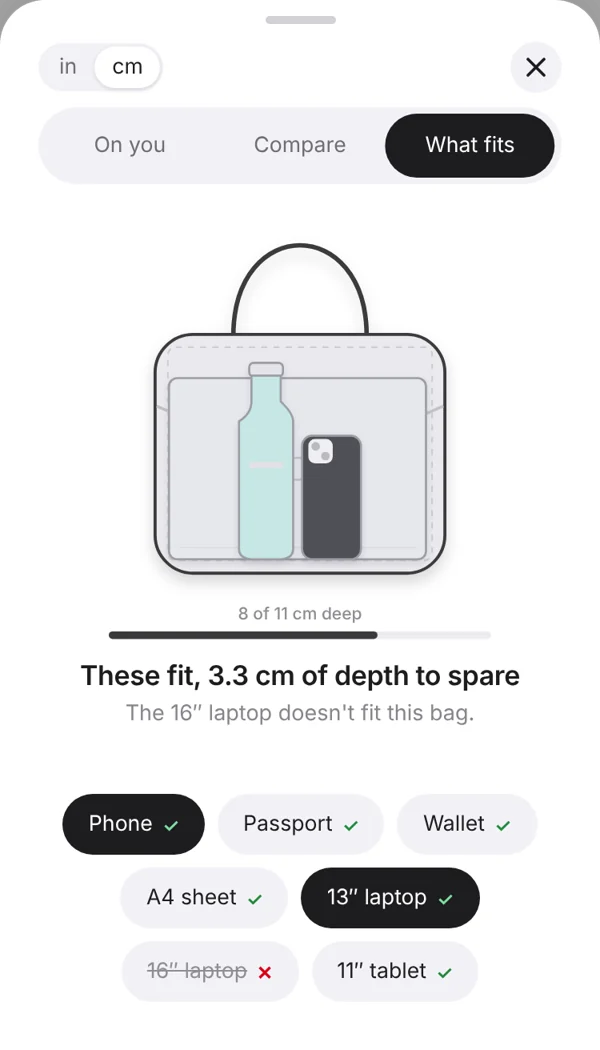
Shoppers want to know what fits inside before they buy.
Every airline has its own cabin and checked-bag limits, and they change.
Dimensions shoppers can picture.
AI Frame reads the height, width and depth from your Size Chart, works out what kind of bag it is, and shows the right views for it.
- Handbags and backpacks: On you, Compare and What fits. Suitcases: On you, Compare and Airlines.
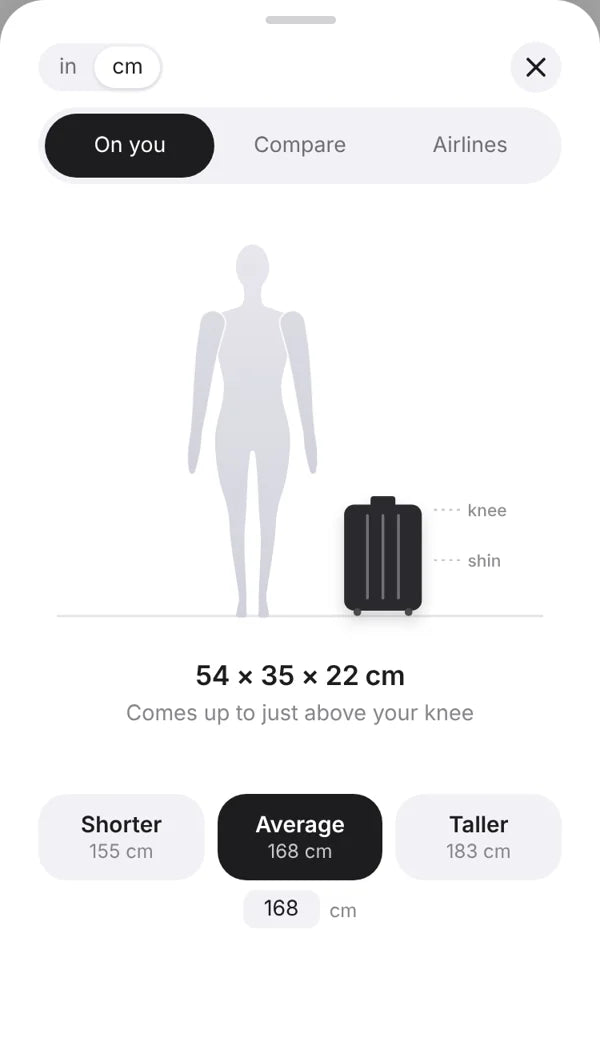
- On you: the bag to scale on a figure of the shopper’s height, with where it sits, such as “Hangs from your hip to your thigh”. By hand, on the shoulder or crossbody when you give the handle and strap drop.
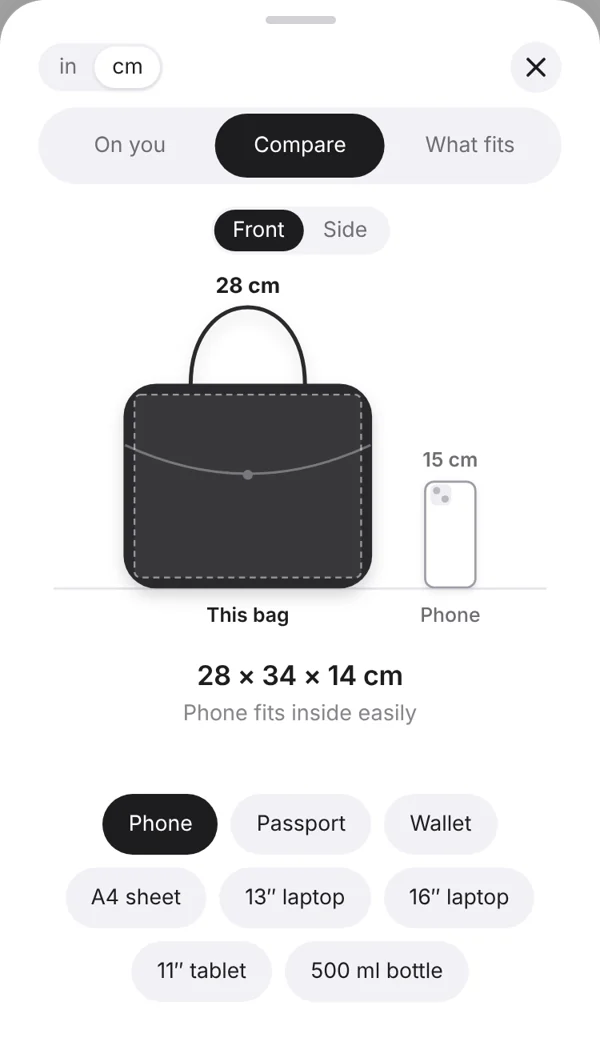
- Compare: front and side next to a phone, passport, wallet, A4 sheet, laptop, tablet or 500 ml bottle.
- What fits: which of their things fit inside, and how much depth is left. Soft bags are marked as estimates.
- Centimetres or inches, as the shopper prefers.
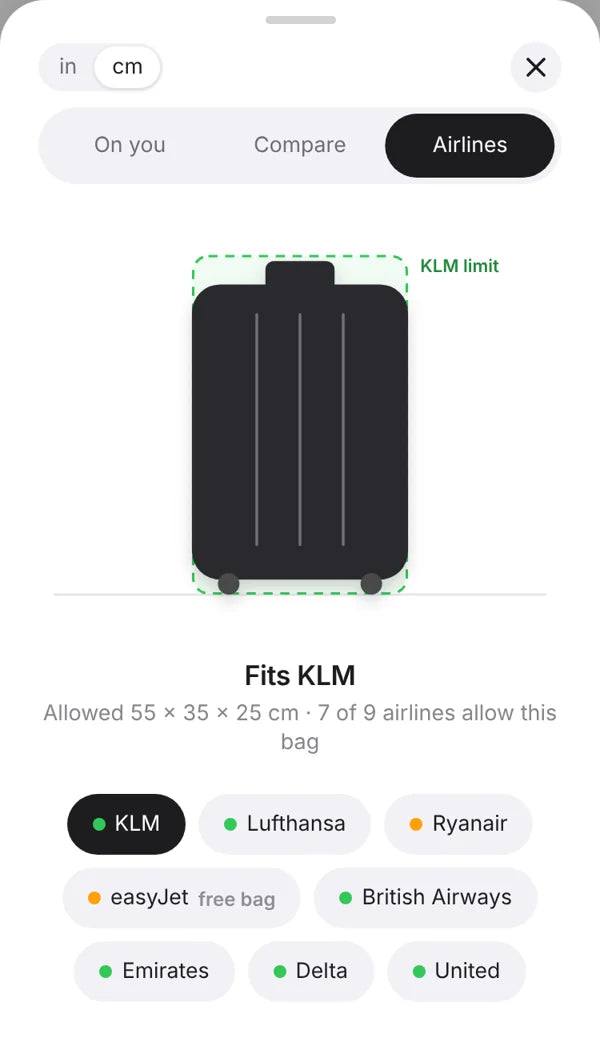
Which airlines it fits.
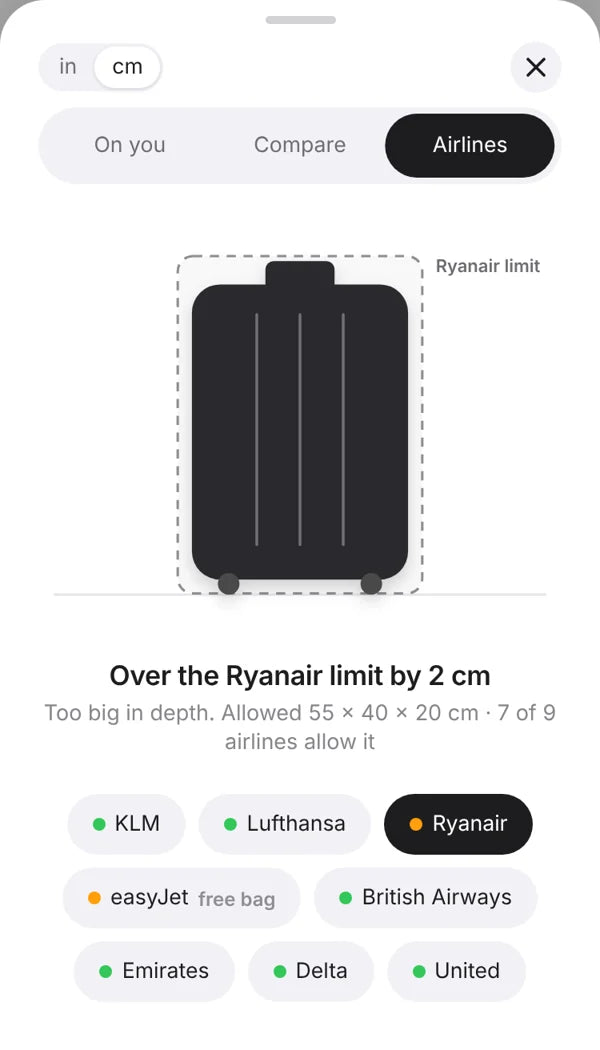
For carry-on and check-in suitcases, AI Frame compares the case with each airline’s baggage limits and says plainly whether it fits.
- Fits or over, per airline: “Fits KLM” or “Over the Ryanair limit by 2 cm”, with which side is too big.
- The full picture: “7 of 9 airlines allow this bag”, with each airline’s allowed size.
- Cabin and checked bags. Check-in cases are compared with each airline’s checked-bag size and weight.
- The shopper’s airlines first, ordered for the country they shop from.
- Kept honest: limits are taken from each airline’s own baggage page, wheels and handles count, and shoppers are told policies vary by fare and can change.
- Your choice: show all nine airlines, only the ones you pick, or none.
Scale, not a try-on.
Bags and luggage don’t use the shopper’s photo. They are drawn to scale, which shows how big a bag really is more clearly than a photo would.
- To scale on a figure of their height: shorter, average, taller or their own height.
- Where it sits, from the knee to the shoulder.
- Front and side views, so depth is clear.
Bags and luggage are drawn to scale from your measurements. Virtual Try-On is not used for this category.
What you set up, and what shoppers get.
- Height, width and depth for each bag, from the bags template.
- Add the handle and strap drop to show how it is carried.
- The bag type is read from the product type, title, tags or collections. You can override it.
- Pick which airlines appear for luggage, or hide them.
- Open See the size on the product page.
- Switch between On you, Compare and What fits or Airlines.
- The bag at real size, next to them and their things.
- For suitcases, which airlines it fits.
From dimensions to a size they can picture.
These are the real screens shoppers see.
The commercial outcomes it supports for bags and luggage.
We show you the usage, and you can measure the impact yourself. We don’t promise numbers.
Shoppers who can picture the size, and know a suitcase fits their airline, have fewer open questions before adding to cart.
Influenced revenue
Seeing the real size, what fits and the airline limits gives shoppers less reason to buy a bag that is bigger or smaller than they thought.
Return / refund rate
“Does a 13-inch laptop fit?” and “Is this cabin size for Ryanair?” get answered on the page.
Your own support inbox, not AI Frame
Shoppers explore the bag at scale, with their own things and their own airline.
Size Chart opens
Size and try-on numbers show how shoppers use AI Frame, not that it caused a sale. To measure the real difference, run a holdout test in your Impact Dashboard. A share of shoppers doesn’t see AI Frame, and the dashboard compares how both groups convert.
Some features, such as the outfit builder and the full Impact Dashboard, depend on your plan.
Bags & Luggage questions merchants ask.
What does my Size Chart need?
Height, width and depth for each bag. The bags template has the columns ready. Add the handle and strap drop if you want to show how the bag is carried.
Which airlines are included?
KLM, Lufthansa, Ryanair, easyJet, British Airways, Delta, United, Southwest and Emirates. They are ordered for the country the shopper is in, and you can choose which ones appear or hide them.
Where do the airline limits come from?
From each airline’s own baggage page. Wheels and handles count toward the limit where the airline says so. Shoppers are told that policies vary by fare and can change.
How does AI Frame know if it’s a suitcase?
It reads the product type, title, tags and collections, for example “carry-on” or “check-in”. You can set the type yourself if needed.
Can shoppers try a bag on with their photo?
No. Bags and luggage are drawn to scale from your measurements, which shows the real size more clearly than a photo would.
Which units are supported?
Centimetres and inches. Shoppers can switch on the product page.