
Clothing size recommendations and visual try‑on for Shopify.
Shoppers find their size in a few quick questions, matched to your Size Chart, then see the piece on their own photo before they buy.


 Virtual Try-On
Every store sizes clothing differently.
A shopper who is an M in one brand can be an L in the next. When the product page can’t tell them which size to pick or how it will look on them, they guess, order two sizes, or leave.
Size labels change from brand to brand, and even between cuts in the same store.
Most shoppers have never measured their chest, waist or hips, so a chart alone often doesn’t help.
A product photo on a model or on white doesn’t show how the piece looks on the shopper.
A size from a few quick answers.
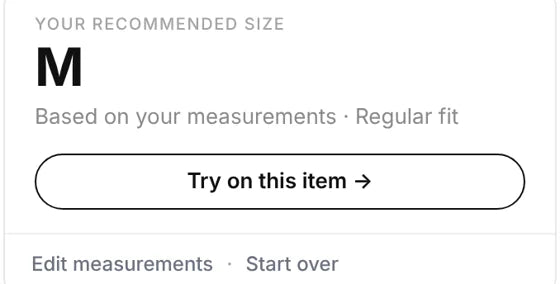
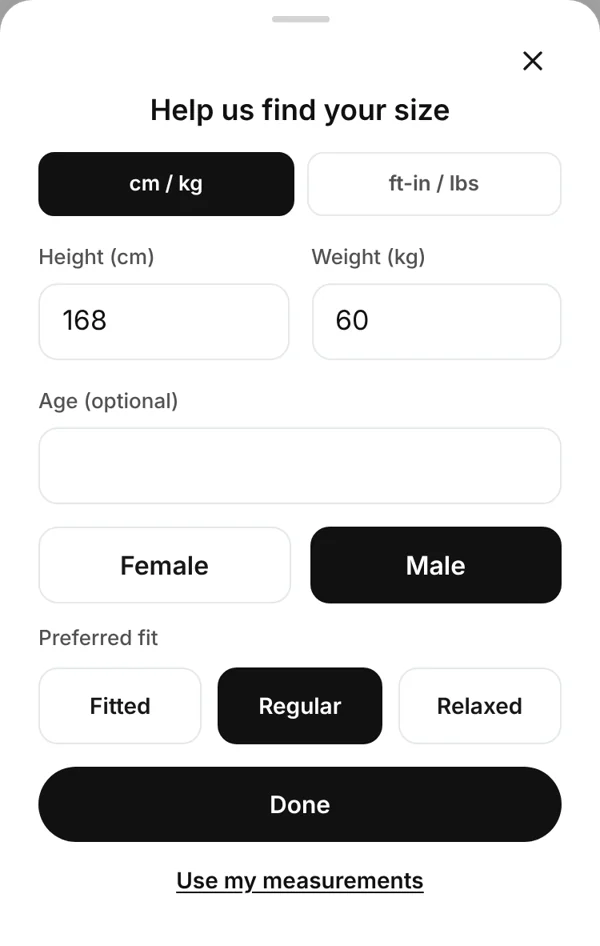
Shoppers answer a few questions. AI Frame estimates their body measurements and matches them to your Size Chart for that product.
- Height and weight, in cm and kg or feet, inches and pounds, plus female or male. Age is optional.
- Preferred fit: fitted, regular or relaxed.
- Body measurements estimated for chest, waist, hips, shoulders and inseam, from public body-measurement data (ANSUR II and CDC NHANES). Never from the shopper’s photo.
- Or their own numbers. Shoppers who know their measurements can type bust, waist, hips and inseam.
- An optional shape step lets shoppers adjust shoulders, waist, hips and leg length compared with people of their height and weight.
- Between two sizes? You choose per Size Chart whether to size up or down.
The piece on their own photo.
From the size card, shoppers tap Try on this item, add a photo and see the garment on themselves.
- Waist-up or full-body photos. Dresses and full outfits work best with a full-body photo.
- Wearing something similar helps. A similar sleeve length and fit gives the most accurate result.
- Add to cart from the result, or add pieces to an outfit and try them together.
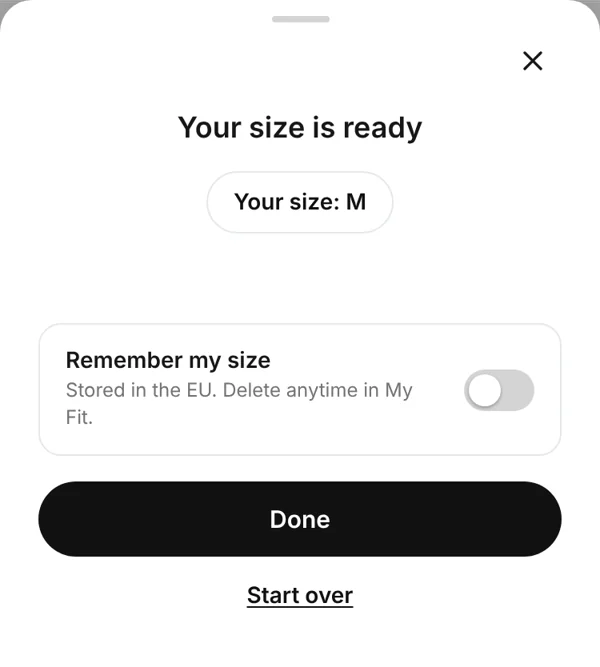
- Saved for next time if the shopper agrees, so their next try-on is faster.
Virtual Try-On shows how a garment may look. It does not measure the shopper and is not a fit guarantee. Fit and appearance won’t be exact.
What you set up, and what shoppers get.
- Import from your store, a photo, a CSV or a PDF, or start from a clothing template.
- Mark the chart as body or garment measurements.
- Choose what happens between sizes.
- Products, collections, tags, a vendor or all products.
- Your existing product images power Virtual Try-On.
- A few quick questions on the product page.
- Optional shape step and their own measurements.
- Then Try on this item.
- Their recommended size on the product page.
- The garment on their own photo.
- A saved Fit Profile for every product.
From the product page to their size, and their try-on.
These are the real screens shoppers see, in order.

The commercial outcomes it supports for clothing.
We show you the usage, and you can measure the impact yourself. We don’t promise numbers.
A clear size and a preview on themselves remove two common reasons to hesitate. Add to cart works from the try-on result.
Size → add to cart · Size → purchase · Try-on → purchase
Shoppers who know their size have less reason to order two. Size returns are tracked per Size Chart, and charts that need a fix are flagged.
Returned for size · Learning from size returns
The outfit builder lets shoppers try a top and bottom together and add the outfit to cart.
Influenced revenue
“Which size should I take?” gets answered on the page, before it becomes an email.
Your own support inbox, not AI Frame
Shoppers check the Size Chart, find their size and see the piece on themselves.
Size Chart opens · Shoppers who got a size · Try-ons made
A saved Fit Profile shows returning shoppers their size on every product.
Not measured yet
Size and try-on numbers show how shoppers use AI Frame, not that it caused a sale. To measure the real difference, run a holdout test in your Impact Dashboard. A share of shoppers doesn’t see AI Frame, and the dashboard compares how both groups convert.
Some features, such as the outfit builder and the full Impact Dashboard, depend on your plan.
Clothing questions merchants ask.
Which measurements does the size finder use?
Height and weight, with optional age, plus female or male and a preferred fit. From these, AI Frame estimates chest, waist, hips, shoulders and inseam and matches them to your Size Chart. Shoppers can also type their own measurements.
Does AI Frame measure the shopper from their photo?
No. Size recommendations are never based on the shopper’s photo. The photo is only used for Virtual Try-On.
My charts list garment measurements, not body measurements. Does that work?
Yes. Mark each Size Chart as body or garment measurements. Shoppers see the right how-to-measure guide for each.
What happens when a shopper is between two sizes?
You decide per Size Chart whether to recommend the larger or the smaller size. The shopper’s preferred fit is taken into account too.
Which units are supported?
Shoppers can enter centimetres and kilograms, or feet, inches and pounds. Size Charts can show centimetres only, or centimetres and inches.
Does it work for children’s clothing?
The size estimate is built on adult body data, so it suits adult clothing. For children’s clothing, shoppers can use the Size Chart directly.