
Help shoppers understand necklace length and placement.
Shoppers see the chain drawn at its real length on a figure, tap where they want it to sit, and see the length that sits there. Then they see it on their own photo.


 Virtual Try-On
“Where will it sit on me?”
A chain length in centimetres doesn’t tell a shopper whether it sits at the collarbone or the chest. And the same length sits differently on different necks.
Chain lengths are numbers most shoppers can’t place on their own body.
The same chain sits higher on a fuller neck and lower on a slim one.
A necklace on white doesn’t show how it looks on the shopper.
The chain at its real length.
AI Frame takes the length from your Size Chart or the product’s variants and draws it on a figure.
- Real lengths, clasp included, from your Size Chart or variants.
- Extenders shown as a range.
- Tap where they want it: AI Frame picks the length that sits closest.
- Neck size: slim, average or fuller.
- One length? Shoppers see just that length. No length, and the screen isn’t shown.
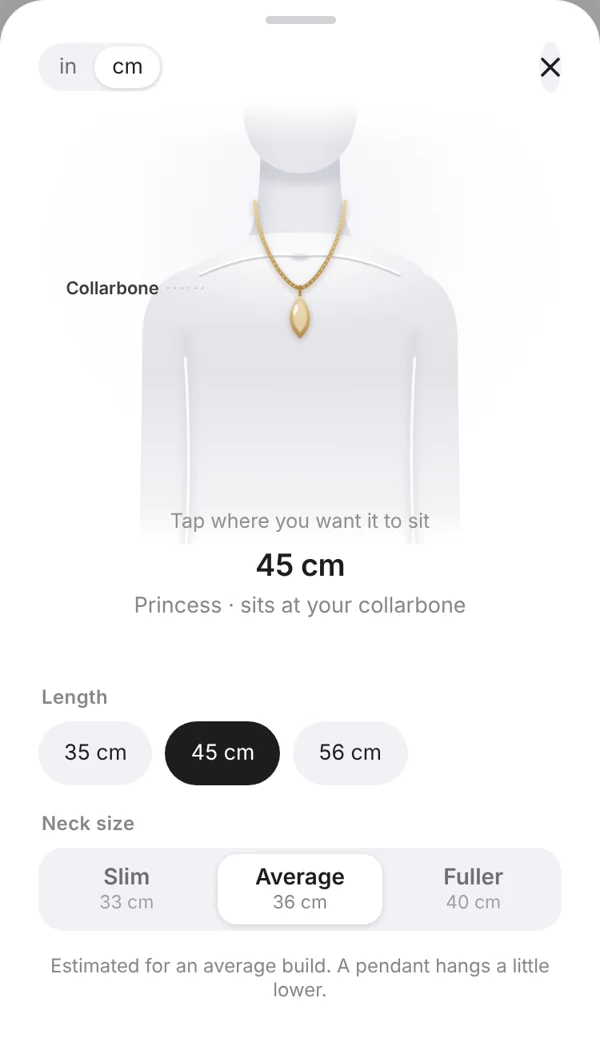
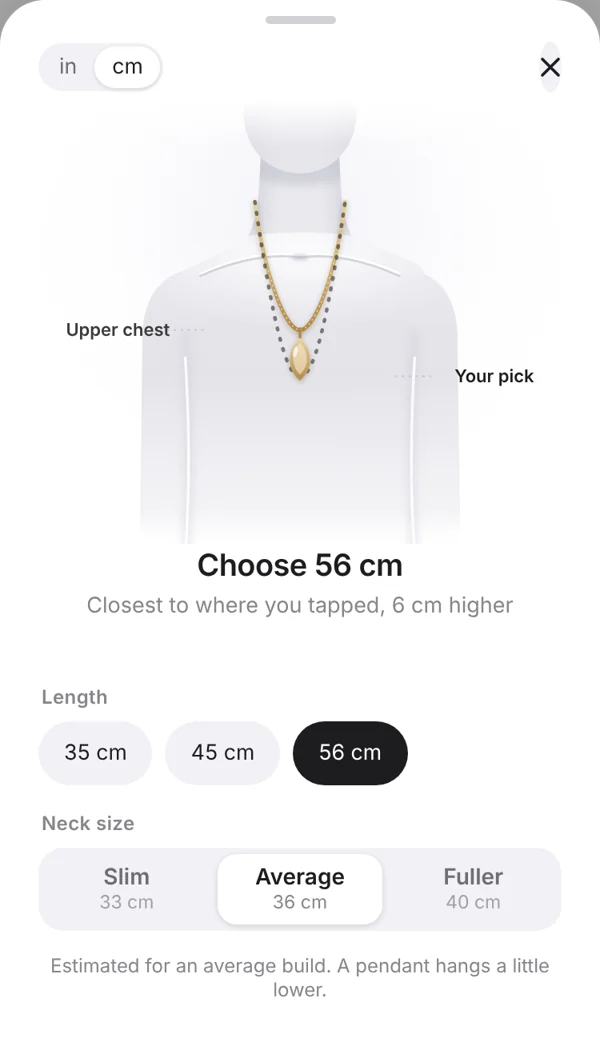
Where it sits, then on them.
Necklaces use both: the chain drawn at its real length on a figure, and the necklace on the shopper’s own photo.
- Placement at the real length, on a figure.
- A photo that shows the neck and upper chest works best for try-on.
- Add to cart from the result, right where they decide.
The figure is estimated for an average build, and a pendant hangs a little lower. Virtual Try-On shows how the necklace may look, not its exact length on the shopper.
What you set up, and what shoppers get.
- Import your charts, or start from the necklace template.
- Add the chain length for each size or variant, and the extender range if there is one.
- Products, collections, tags, a vendor or all products.
- Your existing product images power Virtual Try-On.
- See the chain at its real length.
- Tap where they want it, and choose their neck size.
- The length that sits where they want.
- The necklace on their own photo.
From a chain length to where it sits.
These are the real screens shoppers see, in order.

The commercial outcomes it supports for necklaces.
We show you the usage, and you can measure the impact yourself. We don’t promise numbers.
Shoppers get a clear answer for this necklace and a look at it on themselves, two common reasons to hesitate. Add to cart works from the try-on result.
Try-on → add to cart · Try-on → purchase · Influenced revenue
Seeing where a length sits gives shoppers less reason to buy two lengths and return one.
Return / refund rate
“How long is 45 cm on me?” gets answered on the page, before it becomes an email.
Your own support inbox, not AI Frame
Shoppers check the size and see the piece on themselves before they decide.
Size Chart opens · Try-ons made
Shoppers who save their measurements or photo pick up where they left off on their next visit.
Not measured yet
Size and try-on numbers show how shoppers use AI Frame, not that it caused a sale. To measure the real difference, run a holdout test in your Impact Dashboard. A share of shoppers doesn’t see AI Frame, and the dashboard compares how both groups convert.
Some features, such as the outfit builder and the full Impact Dashboard, depend on your plan.
Necklaces questions merchants ask.
What does my Size Chart need?
The chain length for each size or variant, with the clasp included. Add the extender range if there is one.
What if a necklace comes in one length?
Shoppers see just that length on the figure.
What if there is no length?
The screen is not shown for that product.
How accurate is the placement?
The figure is estimated for an average build, with slim and fuller options. A pendant hangs a little lower than the chain.
Is Virtual Try-On a fit guarantee?
No. It shows how the necklace may look. The length comes from your Size Chart or variants.